
The Genius · software & setup
Unlocked after a paid order
Software and installation instructions become available in your account after a paid The Genius order.
DIMSPORT hardware / The Genius hardware
Existing-customer hardware: The Genius OBD & Bench + Open reading/programming/cloning
Item number: KTHEGENIUS_00_bestandskunden
Ab 1.150,00 €
Net price plus VAT and shipping. Base price; selected options are added.
Request adviceSpecialist trade supplier. Check the total price and delivery details at checkout.
PRODUCT INFORMATION
Description & technical details
OBD, Bench and Open explained clearly →
TheGenius for existing customers
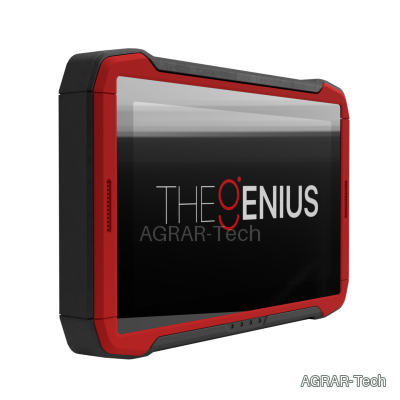
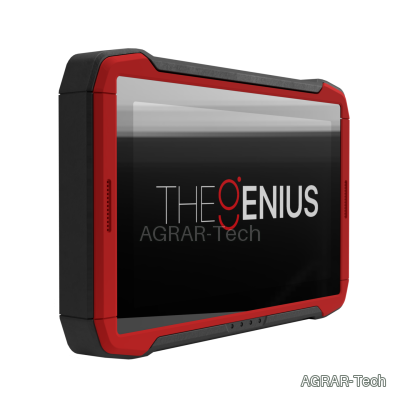
The hardware package for existing customers combines OBD, Bench and Open work in a standalone Dimsport device. Programming takes place directly on the device; reading and writing do not require a permanently connected PC.
Available vehicle categories and protocols depend on the selected activation. Hardware, activation and optional cables are listed separately in the configuration.
Device and connection options
- 10.1-inch touchscreen for selecting vehicles and protocols.
- Integrated lithium battery for mobile use.
- Dual-band Wi-Fi 5 and Bluetooth 5.2 for the supported online and assistance functions.
- Internal monitoring of temperature, current and voltage.
- Existing wiring harnesses can be reused with the appropriate adapter.
- OBD, Bench and Open operation in one device; reading, programming and cloning within the scope of the activated protocol.
Operation and workflow
Standard mode guides you through vehicle selection. Advanced mode lets you select directly from the available protocols.
- Tasks: manage programming jobs.
- Support: access help and create support tickets.
- Dimsport World: access product news, updates and other resources.
Support, updates and licence management
For remote support, the device can be mirrored through a PC. Support tickets can also be created directly on TheGenius. Video tutorials and a knowledge base support setup and use.
Contract management displays renewals and expiry dates. Online support and updates require the necessary connection and entitlement.
Contents
- TheGenius reading and programming tool – F36THEGENIUS
- ABS carrying case – C36TGVAL
- Power supply with MIX4 AC plug set – C36TGALIM
- USB connection cable for PC/laptop – C32GNUSB01
- HD-SUB 44 F to DB25 F adapter cable – F36TG104
- HD-SUB 44 F to OBD-16 M OBD cable – F36TG102
- Universal pin-to-pin connection cable – F36TG101
- Small connection terminals, black/white – F36TG101-S1-B and F36TG101-S1-W
- Medium connection terminals, green/red – F36TG101-S2-G and F36TG101-S2-R
- Large connection terminals – F36TG101-S3
- Crocodile clips – F36TG101-S4
- Cable splitters – F36TG101-S5 and F36TG101-S6
- Battery power cable – F36TG003
- 26-to-10-contact IDC ribbon cable – F36TGF51
- 26-to-16-contact IDC ribbon cable – F36TGF53
- 26-to-26-contact IDC ribbon cable – F36TGF54
- D-SUB 25 F to IDC 26 M cable – F36TG103
- Self-test module for port 1, D-SUB 44 – F36TG106-DB44
- Self-test module for port 2, D-SUB 25 – F36TG106-DB25
Choosing the right setup
For existing customers, the upgrade and renewal of expired licences are available as separate options.
Additional cables and adapters can be selected individually. The displayed surcharges are added to the hardware price.